
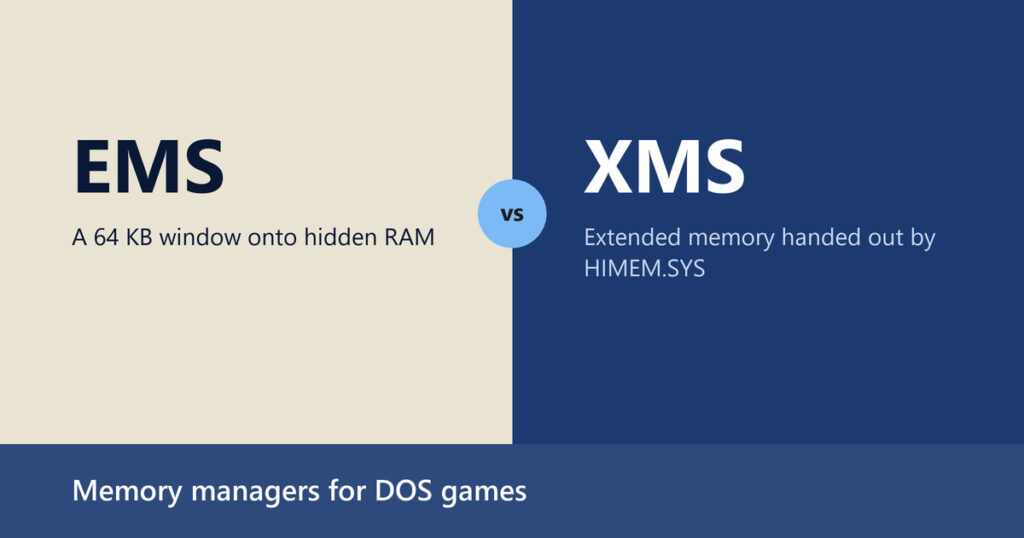
Anyone who sets up a 1990s DOS game by hand eventually hits the same wall: the computer reports megabytes of memory and the game insists it has none left to spare. The wall is not a bug in the game. It is the 1 megabyte address space of the 8086 family meeting a game that wanted more, and the two acronyms in the title, along with the high-memory tricks that came with them, are the workarounds that stood between the two.
This article follows those workarounds in the order they were stacked on top of each other, using Microsoft’s archived command documentation and an engineer’s own account of fighting for every byte, and then asks how much of it still matters once DOSBox is running the game.
One Megabyte, Six Hundred Forty Kilobytes
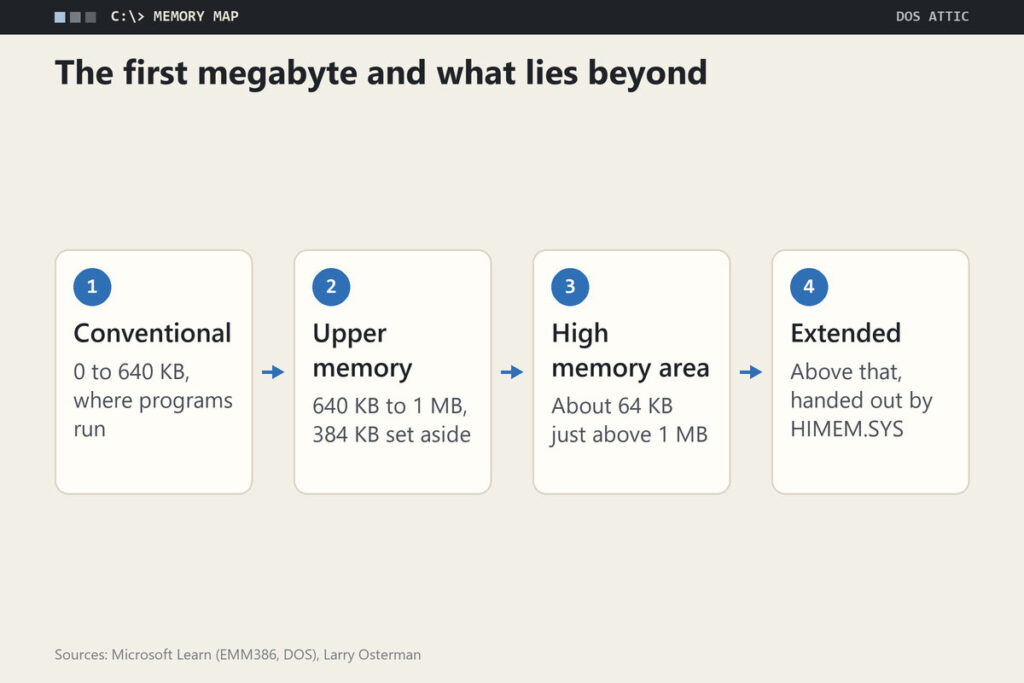
A Microsoft engineer, Larry Osterman, summarizes the underlying limit in a blog post about shrinking a network redirector: the 8086 could address only 1 megabyte of RAM, and DOS programs lived below a boundary he refers to as 640K. The remaining 384 kilobytes were set aside for the system itself. DOS command documentation gives the zone above the boundary a name, the upper memory area, and calls the region below it conventional memory.
Everything else in this article is a trick for getting useful work done outside that first 640 kilobytes, or for clearing space inside it. Games felt the squeeze because every driver loaded at boot, from the mouse to the CD-ROM, lived in the same conventional memory the game itself wanted.
EMS: a Window Into Hidden RAM
The expanded memory specification was developed jointly by Lotus, Intel and Microsoft, which is why it is also called LIM EMS. According to the reference summary, the first widely implemented version, 3.2, supported up to 8 MiB, and version 4.0 raised the ceiling to 32 MiB while absorbing a competing standard called EEMS. The mechanism was bank switching. A single 64 KiB window, the page frame, sat in the upper memory area, and a driver swapped different chunks of the extra RAM into that window on request. Osterman describes the same idea from the hardware side: LIM let a third-party memory card swap memory into the address range from 0xA0000 to 0xFFFFF.
A program that wanted expanded memory therefore had to be written for it. It asked the driver for pages, mapped them into the window, worked on them and mapped something else in. A program written only for the EMS window could not run without that window.
Where EMM386 put the window
On a 386 or later, Microsoft’s driver was EMM386.EXE, which, in Microsoft’s words, provides expanded-memory support and also provides access to the upper memory area. Its page frame was configurable. The EMM386 reference lets you pick the frame with a single digit from 1 to 14, each mapped to a base address such as C000h or D000h, or give an exact segment with the frame= switch anywhere in the ranges 8000h to 9000h and C000h to E000h in steps of 400h.
XMS and the 64 KB Above the Line
Extended memory is everything above 1 megabyte, and the Microsoft driver that managed it for programs that asked for it was HIMEM.SYS. The EMM386 reference even describes EMM386 converting that XMS memory into expanded memory on request. The same driver also arbitrated a strange gift of the PC/AT design. Osterman explains that a software-controllable pin called the A20 line decided whether addresses between 1 megabyte and 1 megabyte plus 64K wrapped around to zero or mapped to real memory. Turn it on and an application got about 64K of extra memory without disturbing any running MS-DOS program. That region became the high memory area, and HIMEM.SYS existed to stop programs from fighting over it.
Why HIMEM came first
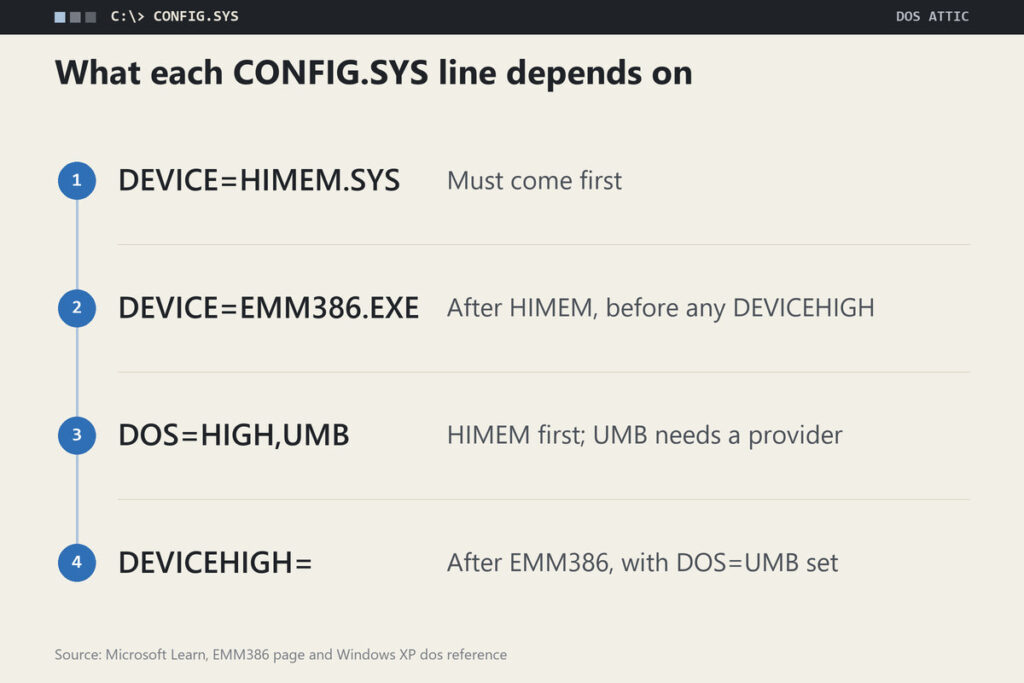
Microsoft’s documentation is blunt about the order. Microsoft’s Windows XP reference for the dos= line, which kept the MS-DOS syntax for its DOS subsystem, says you must install the Himem.sys driver before you specify either dos=umb or dos=high, and the EMM386 page says the HIMEM.SYS device line must come before the EMM386.EXE line. The reason is dependency: EMM386 builds on the memory HIMEM manages, and the dos= line tells MS-DOS to use the areas those drivers expose.
Microsoft’s Own Memory Diet
Osterman’s post is useful for another reason: it shows what the pressure looked like from inside Microsoft. His team’s DOS Lan Manager redirector, a network file system that loaded as a memory-resident program, reacted to feedback from a status review with Bill Gates, as Osterman tells it. Using the high memory area, Osterman says, saved about 30K of a roughly 60K footprint, and the team then moved the redirector’s data into LIM memory when HIMEM was not available. By splitting the program into low and high parts he reduced the below-640K size to 128 bytes, and a further hack brought it to zero in Lan Manager 2.2.
He describes the trick as historical and not something to copy: the stub that enabled the high memory area was stored in the 128 bytes the DOS program header set aside for a command line, a hack with side effects for programs that listed running processes. The point for gaming history is the scale of the effort. If Microsoft’s own network team went to these lengths for a few tens of kilobytes, a game player balancing a mouse driver against a sound driver was facing the same arithmetic with fewer tools.
Reading a CONFIG.SYS Top to Bottom
A working memory setup is only a few lines long, and it follows the pattern in Microsoft’s documentation:
DEVICE=C:\DOS\HIMEM.SYS
DEVICE=C:\DOS\EMM386.EXE NOEMS
DOS=HIGH,UMB
DEVICEHIGH=C:\DOS\MYDRIV.SYS
The last line stands in for any driver you wanted out of conventional memory. What matters is which line has to sit above which.
Three dependencies that fix the order
Microsoft’s pages state three dependencies and no more. HIMEM has to be installed before EMM386, the EMM386 line has to come before any DEVICEHIGH, and HIMEM has to be installed before dos=high or dos=umb. The four lines above satisfy all three. In the Windows XP reference, high asks the MS-DOS subsystem to load part of itself into the high memory area, while umb keeps a link to the upper memory area so that drivers and programs can be placed there. That reference gives low and noumb as the defaults, so a startup file without the line leaves both unused, and it says dos=umb is what lets programs and device drivers load into the upper memory area at all, provided an upper memory block provider is installed. The EMM386 page is the provider in this example: it states that EMM386 also makes it possible to load programs and device drivers into upper memory blocks.
RAM or NOEMS: the trade you actually made
Here is the detail that made game setups genuinely awkward. According to the EMM386 reference, you must use either the ram or the noems switch to get access to the upper memory area. noems gives MS-DOS the upper memory area but no expanded memory. ram gives it both, but the reference states that ram leaves less of the upper memory area for running device drivers and programs. A game that demanded EMS therefore cost you space for drivers, and a game that did not need EMS was better served by noems, so a single setup could not be best for both kinds of game.
Official DOS Edition That Still Exists
If you want to try a game from this era, check what an official edition actually contains. GOG’s X-Wing Special Edition lists the original game and its expansions in three versions, including 1993 (DOS) and 1994 (DOS CD), and states that no activation or online connection is required. The game itself has its own write-up in the 1993 X-Wing article.
DOSBox Switches That Mirror These Drivers
The official DOSBox 0.74-3 manual mentions the two options in two places. The first is an example of its config command, config -set "dos ems=off", which turns EMS emulation off from the DOSBox prompt and shows that the option sits in the [dos] section of the configuration. The second is a troubleshooting list for a game that crashes at startup or hangs: try core=normal, try fixed cycles such as cycles=10000, and try setting ems=false and xms=false, alone or in combination. Together they show that both are options you can toggle, and the list treats turning them off as a diagnostic step for a stubborn game rather than a normal setting. The manual does not state what the defaults are, and the other builds document their own, so confirm in the documentation of the build you run (DOSBox manual).
Defaults, Switches and When to Care
The judgment offered here is a reading of the sources above and not a tested recipe: most people no longer need to think about any of this. The pressures that made EMS, XMS and upper memory blocks matter were conventional-memory pressures on real hardware, and an emulator that presents a clean machine does not have the driver stack that created them. If a game starts, leave the settings alone.
The cases where it still pays to look are narrow. A game that fails on launch is the first. The manual’s own advice there is to switch ems and xms off, one at a time, and see whether the failure moves. A game that misbehaves only with one of them turned on is the second, since those were the two memory types real DOS programs asked for separately. Beyond that, the practical guidance sits in the setup guide on this site and in the comparison of the three DOSBox projects, where the differences between builds are laid out. The old CONFIG.SYS skills remain interesting as history. For play, they are mostly a reason to be glad you do not need them.