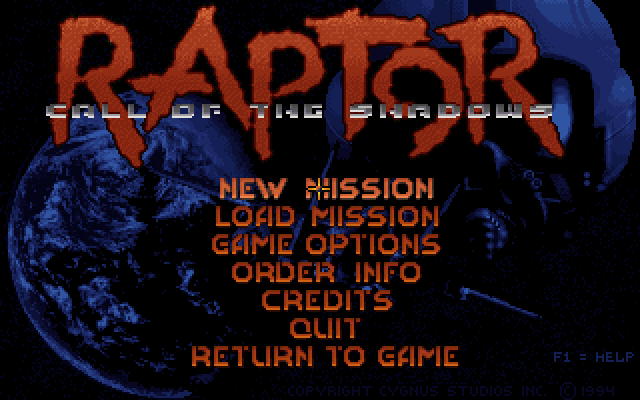
Vertical scrolling shooters were an arcade staple throughout the 80s and early 90s, but DOS never had a huge number of great ones. Raptor: Call of the Shadows, released by Apogee in 1994, is the one that proved the PC could hang with the arcade cabinets.
Apogee Tries Its Hand at a Shmup
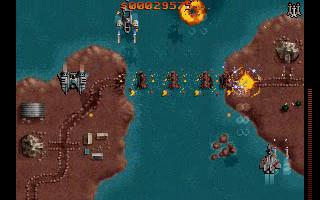
You are a mercenary pilot flying the experimental Raptor fighter, taking on contracts from rival megacorporations across a series of increasingly dangerous combat missions. Between missions, you spend your earnings in an arms shop to upgrade your jet with new weapons, shields, and equipment before heading back out. It’s a simple loop — fly, shoot, earn, upgrade — but Apogee executed it with a level of polish that was unusual for a shareware release, at a time when most of the publisher’s catalog leaned toward platformers rather than arcade-style shooters. That polish shows in everything from the crisp sprite work to the responsive controls, and it’s part of why Raptor is still brought up as one of the better examples of the genre on PC rather than just a curiosity from the shareware era. Developer Cygnus Studios built the game specifically to showcase what VGA hardware could do for a genre that, on PC, had mostly been the domain of ports from console and arcade originals rather than home-grown designs, and the result reads as a confident, original take rather than an attempt to imitate any specific arcade cabinet.
Fly, Shoot, Earn, Upgrade
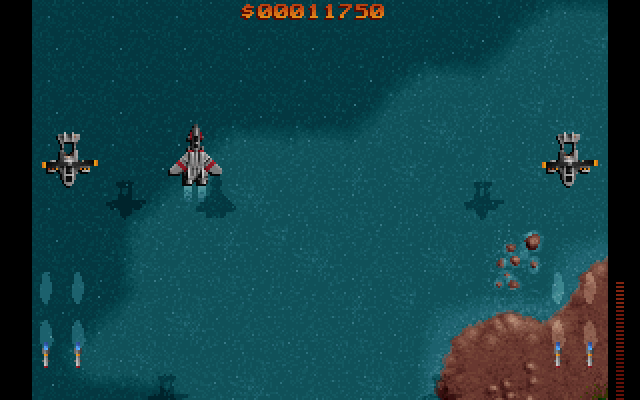
Raptor is a top-down vertical scroller where enemies approach from the top of the screen and you need to destroy them before they destroy you. What sets Raptor apart from a typical shmup is its upgrade system: each successful mission earns you cash, which you spend between levels on weapons like heat-seeking missiles, laser cannons, nuclear bombs, and shield upgrades. Building your loadout over the course of a campaign gives the game a satisfying light-RPG progression layer that most pure arcade shooters don’t bother with. The enemy variety is impressive too — ground vehicles, aircraft, naval vessels, and enormous boss ships each require different tactics and weapon choices to handle efficiently. The game runs silky smooth even by modern standards, and the sprite artwork still looks sharp today. Mission variety helps a lot too — later contracts throw multi-stage objectives and escort-style scenarios into the mix rather than just longer waves of the same enemy types, which keeps the campaign from feeling repetitive even across a fairly long playthrough.
Tips for Building Your Loadout
- Don’t spend every credit the moment you earn it — saving toward a bigger weapon upgrade is usually more effective than a string of small incremental buys.
- Prioritize shield upgrades early if you’re struggling to survive; raw firepower matters less than staying alive long enough to use it.
- Heat-seeking weapons are excellent against fast, erratic enemies, while straight-firing lasers are better suited to large, slow-moving targets like boss ships.
- Save nuclear bombs for genuinely overwhelming screen-clearing moments rather than using them on manageable early-mission enemy waves.
Raptor vs. Arcade Shmups of Its Era
Set against arcade contemporaries, Raptor trades some of the raw bullet-pattern intensity that defined Japanese shoot-’em-ups of the period for a slower-paced, more methodical upgrade loop that rewards persistence over pure reflexes. It’s less demanding on twitch skill than something like a Raiden or Truxton, but the RPG-lite progression gives it a different kind of hook — the pull to finish “just one more mission” for the next weapon upgrade — that pure arcade ports rarely replicate. For a DOS game built primarily for the shareware home market rather than the arcade, that’s a smart design choice, since the genre’s usual demand for split-second reflexes doesn’t always translate well outside a coin-operated cabinet. It’s a design lesson plenty of modern indie shmups have quietly rediscovered — pairing tight arcade action with a persistent upgrade loop tends to broaden a genre’s appeal well beyond players who grew up on quarters and high-score tables. Even the presentation choices reflect that broader ambition: the between-mission shop screens, the narrative framing around mercenary contracts, and the escalating boss designs all give Raptor a sense of forward momentum that a pure score-attack arcade shooter never really needs, because here you’re not just chasing a high score, you’re building toward a more capable ship with every mission you complete. That framing also makes failure feel less punishing than it does in a pure arcade shooter — losing a mission costs you time and maybe some earnings, but it rarely erases hours of progress the way a single arcade credit running out would, which makes Raptor a noticeably more relaxed way to enjoy the genre without losing what makes vertical shooters exciting in the first place. For players who bounced off harder Japanese-style shmups because of their unforgiving bullet patterns, Raptor is a genuinely good place to rebuild confidence in the genre before tackling something more punishing.
DOSBox Setup
First time with an emulator? The DOSBox guide on this site gets you from download to running game. Our roundup of free DOS games has plenty more where this came from.
Install DOSBox if you haven’t already, extract the files to a folder like C:\RAPTOR, then in DOSBox run mount c C:\RAPTOR, switch with c:, and launch with raptor. The game is light enough to run comfortably at DOSBox’s default cycle settings.
You might also like: