Squeezed between the original Caesar and the far more celebrated Caesar III, the 1995 sequel tends to get skipped over in most retrospectives of the series. That’s a shame, because Caesar II is where Impressions Games worked out several ideas — a real campaign structure, a career you actually climb — that the more famous third game gets credit for perfecting.
From One City to a Career
The original Caesar was essentially a single-city sandbox with scenario goals bolted on. Caesar II changes the framing entirely: you start as a minor provincial governor and work your way up through the ranks of Roman society, choosing which provinces to develop, defend, and grow along the way. It’s the first time the series treated city building as a means to a larger political end rather than the entire point, and that structural shift is arguably Caesar II’s biggest contribution to the franchise.
Underneath the campaign map, the actual city-building loop will feel familiar to anyone who has played the original: lay roads, place housing, and keep a web of service buildings — water, religion, entertainment, prefectures — within reach so your plebeian shacks can evolve into denser, taxable housing. Impressions hadn’t yet built the fully simulated walker system that made Caesar III famous (citizens in II move and respond to coverage in a more abstract way), but the bones of that later design are visible here.
Impressions Games had already spent a few years carving out a niche in historical city-building strategy by 1995, and Caesar II reads like a studio testing how much scope it could add without breaking the formula that made the original work. The multi-province campaign map, in particular, is a genuinely bigger design swing than it gets credit for — it’s the piece that turns Caesar II from “a city builder” into “a career”, and it’s the part of the game that most directly foreshadows what Impressions would keep building on for the rest of the decade.
The rank system deserves a little more credit than it usually gets, too. Starting players off as a low-ranked provincial governor rather than dropping them straight into an established capital forces a different kind of decision-making early on — you’re managing scarcity and reputation at the same time as basic infrastructure, and success in one province genuinely opens up new options on the campaign map rather than just unlocking a scripted next level. It’s a lighter-weight version of the kind of progression later 4X and strategy games would build entire systems around.
Tips for a Smoother First Province
- Don’t overbuild housing before your service coverage can support it — empty, undeveloped shacks just eat space and produce nothing.
- Keep an eye on the trade routes between your cities. A struggling settlement can often be propped up by resources from a neighboring one instead of being abandoned.
- Garrison forces matter more than they first appear to. Local uprisings and raids can undo a province’s progress fast if you leave it undefended while chasing rank elsewhere on the map.
- Plan your road grid before you start dropping housing blocks. Retrofitting roads through an already-dense district wastes turns you’ll want for expansion instead.
- Don’t chase rank advancement faster than your provinces can sustain. A governor who neglects an existing city to grab a new one often ends up managing several mediocre settlements instead of a few thriving ones.
Building a City That Actually Grows
The service-coverage model is the part of Caesar II that rewards the most patience. Housing only evolves into denser, higher-value structures when every need in its radius — water access, a nearby temple, entertainment, safety from fire and crime — stays satisfied consistently, not just briefly. That means a city that looks prosperous on the surface can quietly stall out if you let a single service lapse while your attention is on the campaign map elsewhere.
It’s a slower, more deliberate rhythm than most modern city builders ask of you, and it’s easy to misjudge on a first playthrough. My advice: resist the urge to sprawl outward before your core district is fully serviced. A smaller, fully evolved neighborhood generates more tax revenue and looks better on your rank progress than a sprawling grid of half-serviced shacks ever will.
Where It Sits Next to Caesar III
Play Caesar II right after Caesar III and the jump backward is obvious — the third game’s engine actually simulates individual citizens walking your streets, while II still leans on more abstract coverage radii. But Caesar II earns its place in the lineage: the province-hopping campaign, the rank progression, the sense that a single city is one piece of a bigger empire — all of that is Caesar II’s doing, and Caesar III builds on it rather than inventing it from scratch.
I’ll be honest about the rough edges too: the interface hasn’t aged as gracefully as the later game’s, and some of the military and trade management can feel fiddly by modern standards. If you’ve only ever played Caesar III or Pharaoh, expect a slightly clunkier experience here. It’s still worth pushing through, especially for genre historians who want to see where the walker-simulation era of city builders actually came from.
What I’d actually miss if I skipped straight to Caesar III is the campaign’s sense of stakes. Because provinces genuinely can be lost to uprisings or neglect, and because your rank is tied to province-wide performance rather than a single city’s score, Caesar II’s campaign layer creates a kind of pressure that Caesar III’s more contained city-by-city scenarios don’t always replicate. If you only remember the series for its later walker simulation, the career structure here is worth experiencing on its own terms.
Grabbing a Copy and Getting It Running
The DOSBox side of things is refreshingly simple, and if you’ve never set the emulator up before, our DOSBox setup guide covers the basics in plain terms.
Running Caesar II Today
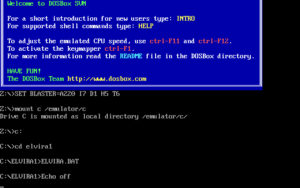
Mount your installed game folder as a virtual drive with mount c [folder], switch to it with c:, and launch the EXE. The GOG release comes with DOSBox already configured, so most players will never need to touch a settings file; if you’re working from your own copy, our DOSBox guide above walks through the cycle and sound settings that keep the simulation from stuttering.
Watching It in Motion
You might also like: