
Fire up a DOS game from the early 1980s next to one from 1993 and you’re not just looking at two different games — you’re looking at two different physical pieces of hardware that happened to share the same beige box. The jump from four garish colors to a quarter-million-color palette took less than a decade, and almost every visual quirk retro gaming fans romanticize today — the cyan-magenta CGA look, the flat 16-color EGA landscapes, the painterly VGA portraits — exists because of a specific chip IBM or a competitor shipped in a specific year. This is the engineering story behind those pixels: three IBM standards, one rebellious clone market, and the workarounds programmers invented to make cheap hardware look like more than it was.
IBM’s Adapter Lineage: Three Cards in Six Years
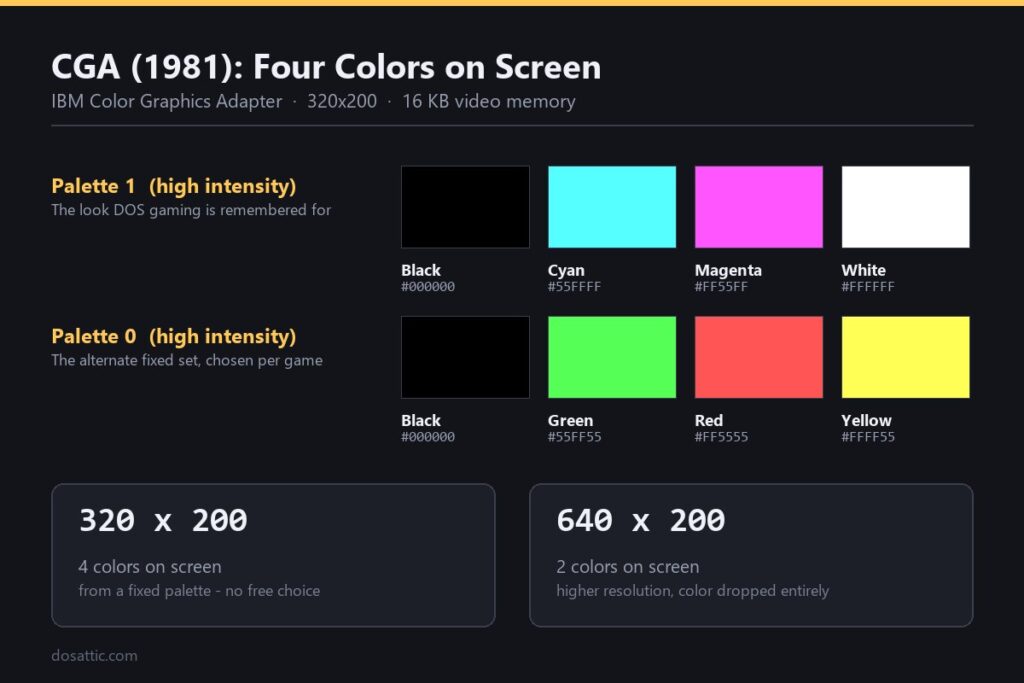
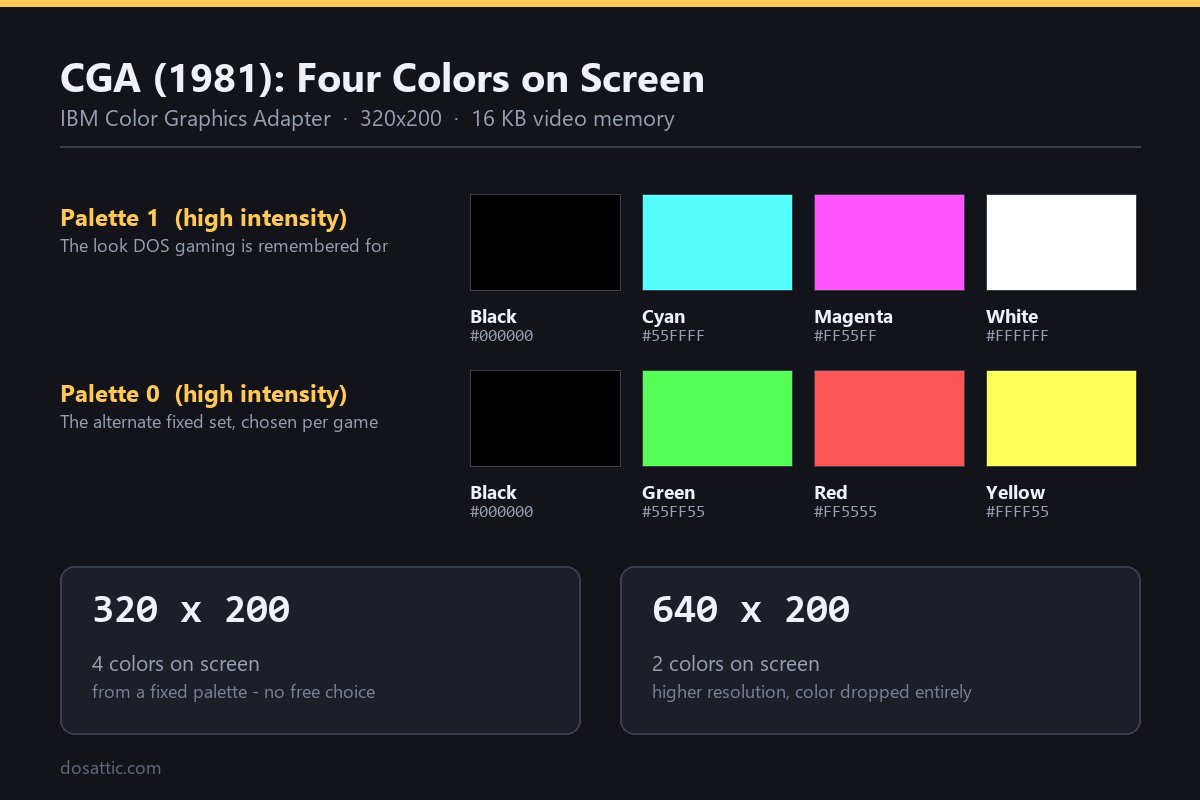
IBM didn’t set out to build a gaming platform. The original 1981 IBM PC was a business machine, and its Color Graphics Adapter (CGA) was an afterthought next to the monochrome display adapter aimed at spreadsheets and word processors. CGA shipped with 16 kilobytes of video memory and could drive either a composite NTSC television or a dedicated RGB monitor. Its signature gaming mode was 320×200 resolution with four colors drawn from a fixed palette — most infamously the cyan/magenta/white/black combination that became a visual meme in its own right, because it was the only four-color palette that didn’t require extra hardware tricks. A secondary 640×200 mode existed, but it dropped color entirely, leaving black and white only.
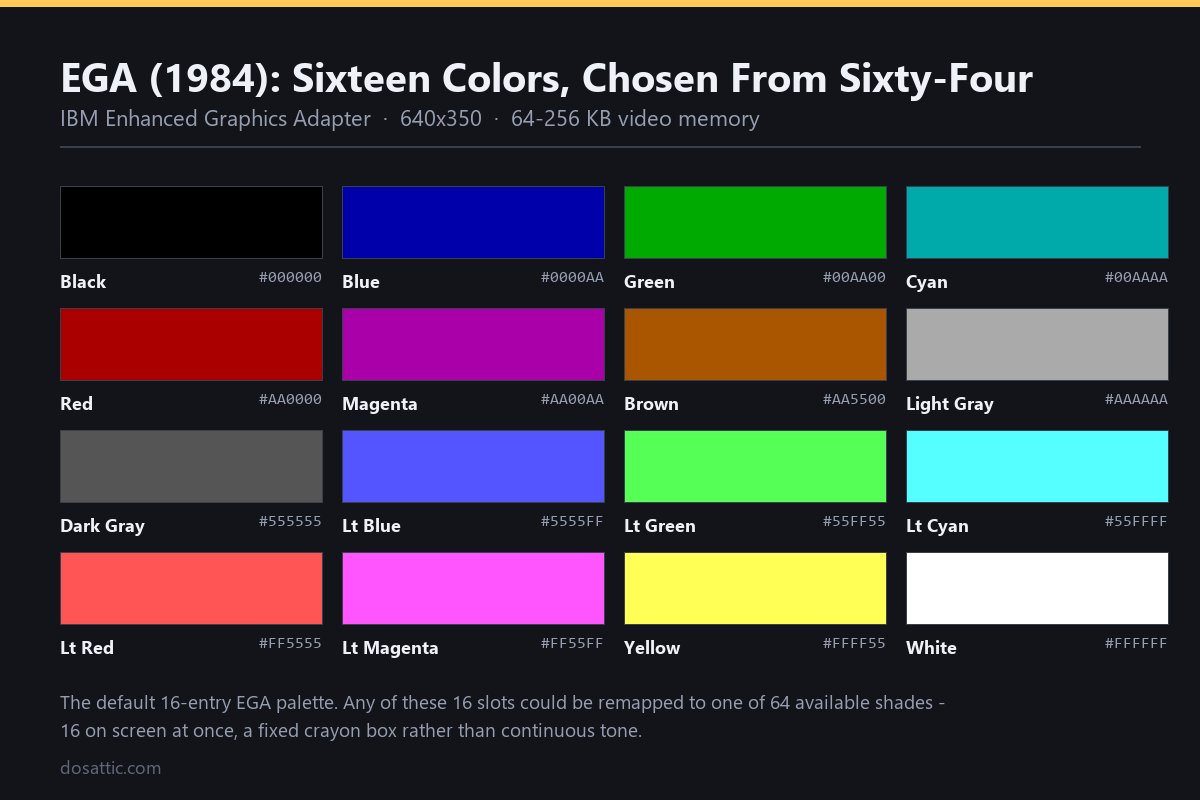
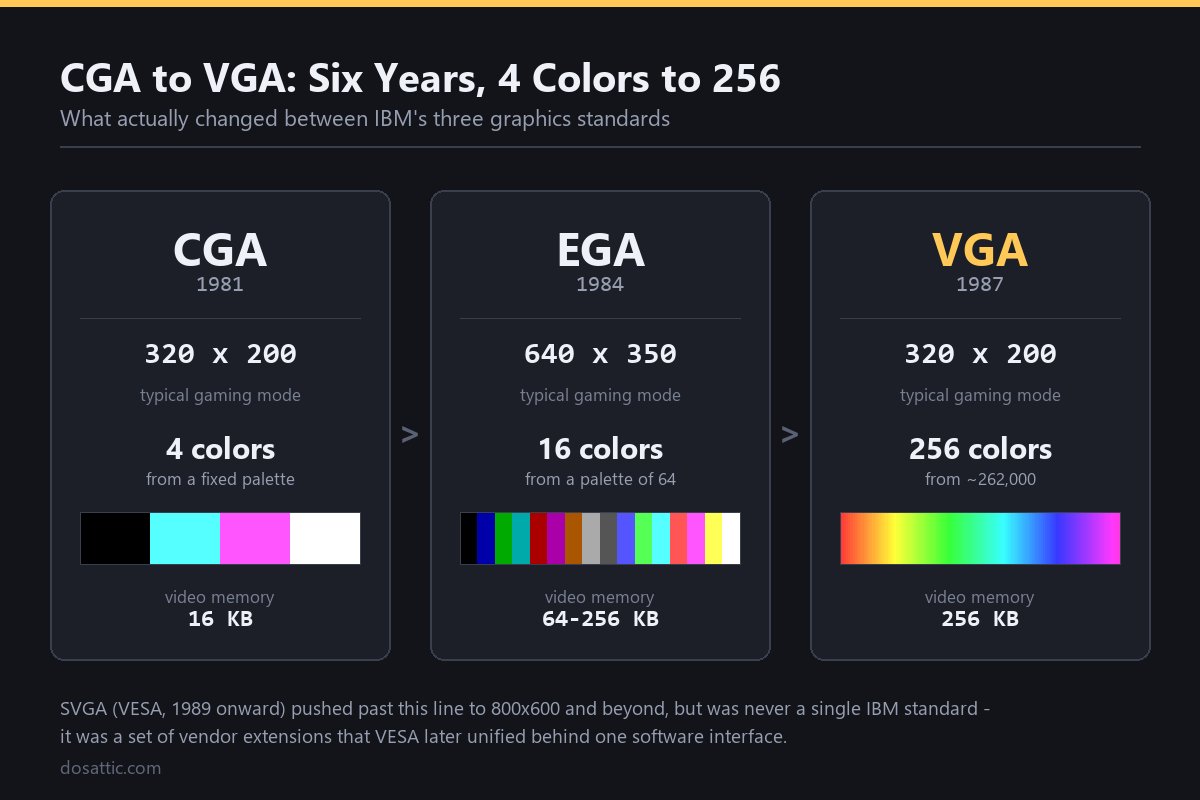
Three years later, in 1984, IBM answered its own limitations with the Enhanced Graphics Adapter (EGA), built for the new PC/AT line. EGA kept backward compatibility with CGA software but added a genuinely useful jump: 640×350 resolution with 16 simultaneous colors, chosen from a wider palette of 64. That “16 from 64” palette is the reason EGA-era games have a distinct look — flat, poster-like color blocks without much gradation, because artists were working with a fixed crayon box rather than continuous tone. Games like Commander Keen leaned into this directly, using EGA’s bright, saturated colors for cartoonish platforming visuals that still hold up as a style choice rather than a limitation. Put plainly, the entire jump from CGA to EGA comes down to that palette math: four fixed colors versus sixteen chosen from sixty-four, one hardware generation apart, and the practical gap in what an artist could paint with is enormous.
VGA arrived in 1987 alongside IBM’s PS/2 systems and changed the math entirely. Its headline gaming mode, known in programming circles as “Mode 13h,” ran at a lower 320×200 resolution but offered 256 simultaneous colors selectable from a palette of over 262,000 — a jump of several orders of magnitude in usable color depth over EGA’s sixteen-from-sixty-four ceiling. VGA also introduced a linear framebuffer, which mattered less to players than to programmers: it made pixel-level manipulation dramatically simpler, which is part of why the VGA era produced such a fast wave of technically ambitious games. A higher-resolution 640×480 mode existed too, but at only 16 colors, so most action and adventure games standardized on the punchier 256-color 320×200 mode instead.
Spec Comparison: What Actually Changed Between Standards
| Standard | Year | Common Gaming Resolution | Simultaneous Colors | Video Memory |
|---|---|---|---|---|
| CGA | 1981 | 320×200 | 4 (from a fixed palette) | 16 KB |
| PCjr / Tandy 1000 | 1984 | 320×200 | 16 | varies (up to 128 KB) |
| EGA | 1984 | 320×200 or 640×350 | 16 (from a palette of 64) | 64–256 KB |
| VGA | 1987 | 320×200 (Mode 13h) | 256 (from a palette of ~262,000) | 256 KB |
| SVGA (VESA) | 1989 standardized | 800×600 and up | 256+ | 512 KB–1 MB+ |
That last row deserves a beat of its own, since it isn’t a single IBM spec the way the other four are. “SVGA” was never one official standard — it was a grab-bag of post-1987 resolution and color extensions that different card manufacturers implemented their own way, until the Video Electronics Standards Association stepped in from 1989 onward to define a common software interface, so a game could target SVGA hardware without shipping a separate driver for every brand of card on the market.
The Clone Wars: How Tandy and PCjr Beat IBM at Its Own Game
Here’s a detail most retrospectives skip: IBM’s own CGA was arguably obsolete the moment it faced its first real competitor, and that competitor wasn’t EGA — it was IBM’s own budget cousin, the PCjr, and the Tandy 1000 line that cloned its video hardware. Both machines shipped in 1984 with an enhanced CGA-compatible chipset that could display all 16 colors simultaneously in the same 320×200 mode where standard CGA was stuck with four. Because Tandy machines were cheap and common in American homes throughout the mid-1980s, a meaningful slice of PC gaming’s install base was running “Tandy graphics” rather than plain IBM CGA, and shareware developers took notice. A number of early-to-mid-80s titles shipped with explicit Tandy/PCjr-enhanced modes as an alternative to the standard CGA four-color mode, giving home users a noticeably richer picture years before EGA cards became affordable. It’s the reason some collectors today will insist an old platformer “looks better” on a Tandy than on a stock IBM CGA card — that’s not nostalgia talking, it’s genuinely different color hardware running behind an identical-looking beige box. It’s also a reminder that the “IBM standard” story of DOS graphics is really a three-way race between IBM, Tandy, and the eventual VGA clone-card manufacturers — not a straight line from one official spec to the next.
The Composite Trick: Getting Sixteen Colors Out of a Four-Color Card
The other workaround worth knowing about is entirely a side effect of analog television engineering, not deliberate IBM design. When a standard CGA card was connected to an NTSC composite monitor or television — instead of a digital RGB monitor — the way the video signal encoded color information created visible “artifacts” where certain black-and-white dither patterns blended into new solid colors that the RGB mode couldn’t produce at all. Programmers who understood this quirk could target the 640×200 monochrome mode specifically to exploit composite artifacting and pull as many as sixteen colors out of hardware that was officially limited to four, at the cost of dropping effective resolution to roughly 160×200. It’s an unintentional feature turned into a deliberate technique, and it’s one of the clearest examples of DOS-era developers treating hardware limitations as a puzzle to be gamed rather than a wall to accept.
Making DOSBox Actually Render the Right Palette
Getting authentic CGA or EGA visuals out of DOSBox requires more than just launching the executable — the emulator defaults to a VGA-class virtual machine, which will either upscale older graphics incorrectly or simply refuse to run a game that expects different hardware. The fix lives in the DOSBox configuration file, under the machine setting. Setting machine=cga forces a genuine four-color composite-capable CGA card; machine=tandy emulates the enhanced 16-color Tandy/PCjr chipset described above; machine=ega locks in the 16-from-64 palette; and machine=svga_s3 (the default in most modern builds) is appropriate for VGA and SVGA-era titles. Getting this setting wrong is the single most common reason a DOS game “looks broken” in DOSBox — a CGA game launched under the default SVGA machine type can render with the wrong palette or fail to start at all. Pair the correct machine type with a moderate cycles setting (1500–3000 for CGA/EGA titles is usually plenty, since these games were built for far slower processors than VGA-era ones) and you’ll get period-accurate visuals rather than a modern approximation of them.
Reading a DOS Game’s Hardware Choices at a Glance
- Check for a graphics mode prompt at launch. Many CGA/EGA/VGA-era games ask you to pick your adapter type before the title screen appears — always match this to your DOSBox
machinesetting. - Watch for dithering patterns in CGA titles. Artists simulated extra shades by alternating pixels of the four available colors in checkerboard patterns; it’s a deliberate technique, not a rendering error.
- Compare EGA and VGA releases of the same game side by side when both exist. Some studios shipped separate EGA and VGA versions of the same title, and the palette differences reveal exactly how limiting 16-from-64 really was next to 256-from-262,000.
- Listen for Tandy-specific music. Games with Tandy support often used the three-voice Tandy sound chip for richer music than the PC speaker alone could manage, separate from the graphics enhancement.
- Don’t assume higher resolution always means “better.” VGA’s 640×480 mode dropped to 16 colors, which is why most action games of the era preferred the lower-resolution, higher-color 320×200 Mode 13h instead.
Legacy: Why These Palettes Still Define “Retro” Today
The technical ceiling of each standard directly shaped what kind of game could be made on it, which is why CGA, EGA, and VGA aesthetics are now shorthand for entire eras of PC gaming rather than just footnotes in a hardware timeline. Early VGA titles like Wolfenstein 3D and, a year later, Doom pushed the format toward fast 3D rendering precisely because Mode 13h’s linear framebuffer made real-time pixel manipulation practical for the first time. Earlier EGA-era platformers like Dangerous Dave and adventure games like Prince of Persia show the flatter, poster-color look that 16-from-64 palettes enforced. Modern indie developers still deliberately imitate these exact constraints — 4-color CGA palettes and 16-color EGA-style dithering are recognizable enough as visual languages that they get reused on purpose, decades after the hardware that created them became obsolete.