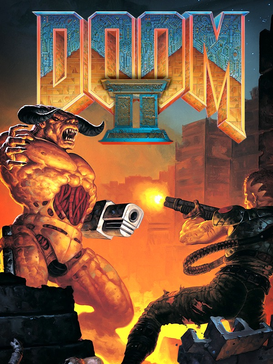
If Doom opened the floodgates, Doom II: Hell on Earth burst them wide open. Released in 1994, the sequel took everything that made the original legendary and scaled it up — more maps, more monsters, more weapons, and a double-barreled shotgun that remains one of the most satisfying weapons in gaming history.
Doom’s Sequel Under Time Pressure
Doom II was developed by id Software and released in October 1994, less than a year after the original Doom had already reshaped the industry. The story picks up where Doom left off: you’ve survived Hell, returned to Earth, and found that the demons got there first. Humanity’s last survivors are waiting for evacuation, and you need to fight through 30 maps across city streets, industrial facilities, and eventually back into Hell itself to find and destroy the source of the invasion. Rather than reinvent the engine, id’s team — working at speed to capitalize on the original’s momentum — focused their energy on new content: new weapons, new monsters, and a much larger set of levels than the first game’s episodic structure allowed, treating Doom II as a full, standalone campaign rather than an expansion pack. That decision to sell it as a full retail release rather than another round of shareware episodes also marked a turning point for id — Doom II shipped exclusively through traditional retail channels, a sign that the studio, and the industry watching it, had started to see id’s games as mainstream commercial products rather than shareware curiosities. That transition mattered for the wider industry too — it’s part of a broader shift where PC gaming moved from a hobbyist, mail-order-driven scene toward the retail-shelf model that would define the rest of the decade. Doom II sits right at that hinge point, both as a creative high point for id and as a marker of how quickly the entire PC games business was maturing around it.
The Super Shotgun Changes Everything
Doom II keeps the core formula of the original but adds one critical tool: the Super Shotgun. This double-barreled weapon fires two shells at once and devastates enemies at close range, fundamentally changing how combat feels compared to the original game’s single-barrel shotgun. New enemy types add fresh challenges on top of the returning roster — the Arch-Vile can resurrect fallen demons and burns you with an unblockable line of fire, the Revenant fires homing rockets that require active dodging rather than just strafing, and the Mancubus launches alternating fireballs from two chest-mounted cannons. Each new enemy forces you to rethink positioning and priority targeting rather than just holding down the trigger. The 30 maps are larger and more architecturally complex than Doom’s original episodes, and the final map, “Icon of Sin,” requires rocket-launching an exposed brain embedded in a wall — an absurd but genuinely memorable finale.
Tips for New Doomguys
- Pick up the Super Shotgun as soon as a level offers it — it out-damages the pistol and regular shotgun by a wide enough margin to change how you approach every fight afterward.
- Keep moving against the Revenant’s homing rockets; strafing in a straight line won’t lose them, but breaking line of sight around cover will.
- Prioritize the Arch-Vile in any group fight — letting it live means every demon you’ve already killed nearby can potentially come back.
- Conserve rockets and cells for the Mancubus and other heavily armored enemies rather than burning them on weaker fodder like Imps and Zombiemen.
Doom II vs. the Original Doom
Set next to the original, Doom II is where the series hit its creative peak for a lot of players. The weapon variety, enemy roster, and map design all feel more confident than the first game, which was still finding its footing in places. The Super Shotgun alone is arguably worth the price of entry on its own, and the level design leans into larger, more maze-like spaces that the original’s more linear episode structure didn’t really attempt. Where the original arguably still wins is atmosphere — Doom’s earlier levels have a tighter, more consistently eerie mood, while Doom II occasionally trades that atmosphere for scale and spectacle.
The Modding Legacy That Never Stopped
Doom II also spawned one of the most enduring modding communities in gaming history. Thousands of fan-made WAD files are available online, many of which rival or exceed the quality of the original campaign, and the modding scene around this engine has genuinely never stopped producing new content, more than thirty years after release. Once you finish the base game, there’s effectively unlimited additional content to explore, and that ongoing community is a huge part of why Doom II still feels alive today rather than like a museum piece. Source ports like GZDoom and Doom Retro have kept the community’s tools current with modern displays and hardware, which means a thirty-year-old engine is, in practice, still receiving active support in a way very few games of any era can claim.
New to DOSBox? Our complete setup guide walks through everything you need, and our top free DOS games list is worth browsing for more classics.
New to DOS gaming? Our DOSBox installation guide will get you running in minutes. Mount the game folder with mount c C:\Games\Doom2, type c: then DOOM2.EXE, or use the source port GZDoom instead if you want widescreen and high-resolution support alongside full mod compatibility.
You might also like: