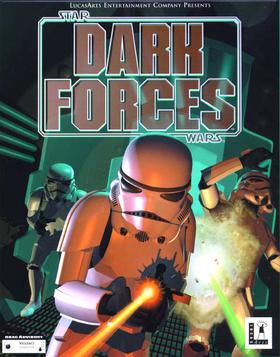
id Software’s Doom engine spawned countless imitators, but Dark Forces stood apart from all of them. LucasArts’ 1995 Star Wars first-person shooter brought the galaxy far, far away into your PC with unprecedented atmosphere, a genuinely complex level design, and a protagonist who became one of the Expanded Universe’s most beloved characters.
About Dark Forces
Dark Forces was developed and published by LucasArts in 1995. You play as Kyle Katarn, a mercenary hired by the Rebel Alliance to steal the Death Star plans — a mission later attributed to Princess Leia in the films. The discovery of the Empire’s Dark Trooper project sends Kyle on a 14-mission campaign across Star Wars locations including the Death Star, Nar Shaddaa, and Coruscant.
Gameplay
Dark Forces uses LucasArts’ Jedi engine, a custom technology that surpassed Doom in several key ways: true room-over-room architecture, looking up and down, jumping, swimming, and moving platforms. These features allowed level designs impossible in Doom — multi-story complexes, flooded cargo holds, and outdoor environments with genuine height variation.
The weapon selection is pure Star Wars: blaster pistol, stormtrooper rifle, thermal detonators, the Bryar pistol, and eventually the devastating Dark Trooper phase cannon. Enemies include stormtroopers, probe droids, Gamorrean guards, and the formidable Phase III Dark Troopers.
Why It’s Worth Playing
Dark Forces captures Star Wars atmosphere better than almost any game of its era. The ambient sounds, the architecture, the enemy designs — everything feels authentic to the films. Kyle Katarn’s story is compelling enough to sustain 14 missions, and the level design complexity remains impressive today. It’s a must-play for Star Wars fans and DOS shooter enthusiasts alike.
How to Download Dark Forces
New to DOSBox? Our complete DOSBox setup guide walks you through everything you need. Looking for more classics? Browse our top free DOS games list.
Watch Gameplay
How to Run with DOSBox
Check our DOSBox guide and run DARK.BAT or JEDI.EXE from the mounted folder.
You might also like: